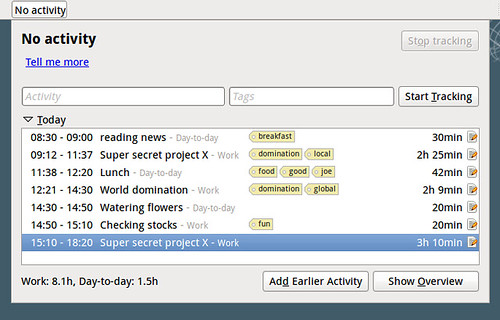
Hamster is such a time tracker that I found to be very useful, easy to use, and enables you to obtain statistics about your daily/weekly/yearly work.
It gives you the possibility to introduce information from the shell, but there's also a graphical indicator available, which fits perfectly with Ubuntu Gnome and Unity.
Install instructions
If you need more details about the following installation and configuration commands, you can consult this article.# Add repository sudo add-apt-repository ppa:albertomilone/hamster-indicator # Add description to repository for easier identification sudo sed -i.save 's/$/ #Hamster-Indicator Time-Tracker/' /etc/apt/sources.list.d/albertomilone-hamster-indicator-natty.list # Install Hamster Indicator sudo apt-get update sudo apt-get install hamster-indicator
Configuration
The hamster indicator permits to change how and which information to show on the Unity panel.# Show all possible configuration values and values gconftool-2 -R "/apps/hamster-indicator" # Toggle Icon Glow gconftool-2 --toggle "/apps/hamster-indicator/icon_glow" # Toggle Show Label gconftool-2 --toggle "/apps/hamster-indicator/show_label" # Set enough space for label gconftool-2 --set "/apps/hamster-indicator/label_length" --type int "20"
Database location
It might be interesting to now, where Hamster stores it's data, for example for backups, or if you want to copy/share the data to another Ubuntu installation.~/.local/share/hamster-applet/hamster.db
